快速接入
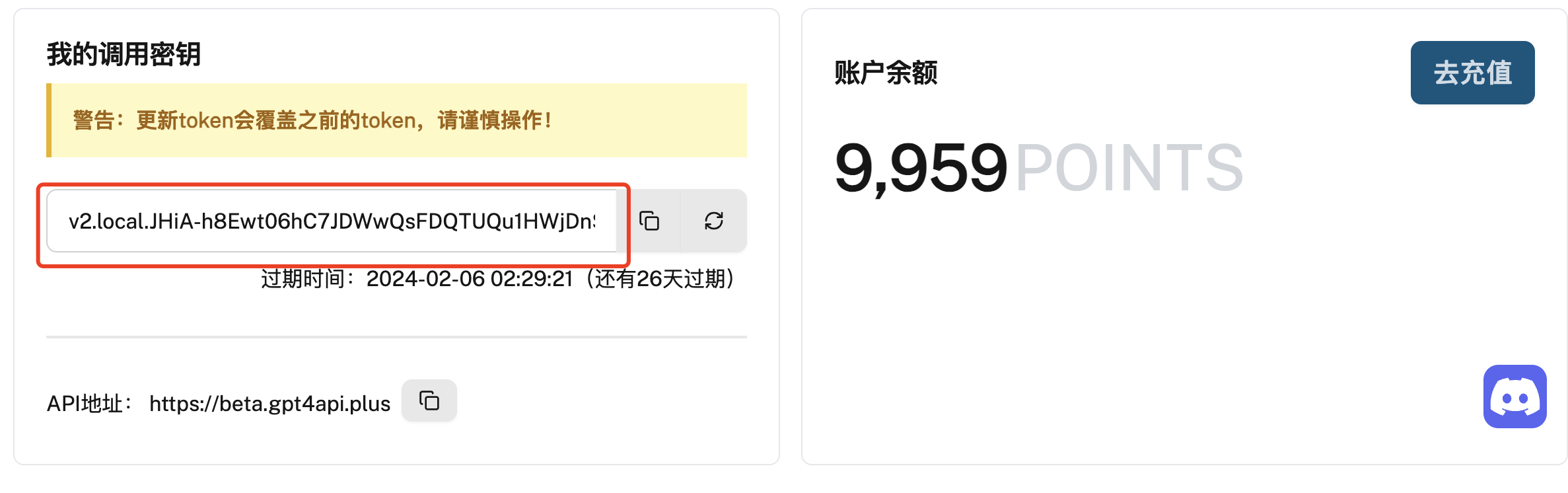
- 获取 API 密钥 首先,您需要通过访问 麻雀GPTs-API开发者平台 注册并获取 API 密钥。API 密钥将用于对接 GPT4API服务。注意:切勿泄露API的秘钥,请妥善保管。
接口说明
文件最大上传大小:**100M**,如需要增加上传大小,**请联系客服**。
普通版URL
- 文件上传:https://beta.gpt4api.plus/standard/uploaded
- All-Tools: https://beta.gpt4api.plus/standard/all-tools
- Gizmo-GPTs: https://beta.gpt4api.plus/standard/gizmos
并发版URL
- 文件上传: https://beta.gpt4api.plus/concurrent/uploaded
- All-Tools: https://beta.gpt4api.plus/concurrent/all-tools
- Gizmo-GPTs: https://beta.gpt4api.plus/concurrent/gizmos
代码调用示例
PostMan 在线调试接口
Curl 接口调用示例
上传图片
curl --location 'https://beta.gpt4api.plus/standard/uploaded' \
--header 'Authorization: Bearer <自己的Access_Token>' \
--form 'conversation_id=""' \
--form 'type="multimodal"' \
--form 'file=@"/Downloads/7346cfed-4ead-4c83-8c65-c985e68e701e.webp"'
返回结果:
{
    "conversation_id": "internal-QsjjbCbcHw82M35LV3kJ2D",
    "attachment": null,
    "part": {
        "name": "img.png",
        "asset_pointer": "file-service://file-2L6CSBw3UBBLRp192Wu3F3X8",
        "size_bytes": 295320,
        "width": 1024,
        "height": 1024,
        "mimeType": "image/webp"
    }
}
对图片(多模态)对话
- 将上传返回的结果粘贴到:parts
- 将会话id粘贴到:conversation_id
curl --location 'https://beta.gpt4api.plus/standard/all-tools' \
--header 'Content-Type: application/json' \
--header 'Authorization: <自己的Access_Token>' \
--data '{
    "message": "描述下图片",
    "model": "gpt-4",
    "conversation_id": "internal-QsjjbCbcHw82M35LV3kJ2D",
    "parts": [
        {
            "name": "img.png",
            "asset_pointer": "file-service://file-2L6CSBw3UBBLRp192Wu3F3X8",
            "size_bytes": 295320,
            "width": 1024,
            "height": 1024,
            "mimeType": "image/webp"
        }
    ]
}'
返回结果:
{
    "created": 1708834483,
    "message_id": "7da02095-a47b-4644-8439-9540ba42a4c4",
    "conversation_id": "2d8a64fd-bf2c-4825-a428-a93f0f33d56d",
    "end_turn": false,
    "contents": [
        {
            "conversation_id": "2d8a64fd-bf2c-4825-a428-a93f0f33d56d",
            "error": null,
            "message": {
                "author": {
                    "metadata": {},
                    "name": null,
                    "role": "assistant"
                },
                "content": {
                    "content_type": "text",
                    "parts": [
                        "这幅画描绘了一幅充满超现实主义风格的场景。画面中心是一只巨大的手,手指呈现出彩色的漩涡状纹理,似乎在空中悬浮。手和手指上融合了许多人脸,每个脸部表情都不同,从而创造出一种流动且活生生的视觉效果。手指尖部形成的漩涡似乎在空中引导着天气和云彩,创造出一条流动的云带,将天空分割成温暖和冷色调的两个部分。\n\n在画面的下方,一群不同年龄和着装的人群站在湖边,他们背对观众,朝着这只巨手和奇幻的天空望去,一些人伸出手指指向天空,似乎在对这一景象做出反应。这群人中既有穿着现代服装的人,也有看似来自过去时代的人,增加了场景的神秘感。\n\n周围的环境是一片宁静的湖边景致,湖水平静如镜,远处是密集的森林。云带和天空中的色彩在湖面上形成了倒影,加深了画面的梦幻和超现实感。在前景,我们可以看到一些形状独特、颜色丰富的植物,它们似乎并不属于现实世界,更增强了整个画面的超现实主义氛围。整体而言,这幅画展现了一种超越现实的神秘和和谐之美。"
                    ]
                },
                "create_time": 1708834483.542442,
                "end_turn": true,
                "id": "7da02095-a47b-4644-8439-9540ba42a4c4",
                "metadata": {
                    "citations": [],
                    "finish_details": {
                        "stop_tokens": [
                            100260
                        ],
                        "type": "stop"
                    },
                    "gizmo_id": null,
                    "is_complete": true,
                    "message_type": "next",
                    "model_slug": "gpt-4",
                    "parent_id": "4df09d39-4ebe-41de-ac2a-1697ee36561e",
                    "request_id": "85ad1ebe4afe2c7f-SLC",
                    "timestamp_": "absolute"
                },
                "recipient": "all",
                "status": "finished_successfully",
                "update_time": null,
                "weight": 1
            }
        }
    ]
}
上传文件
curl --location 'https://beta.gpt4api.plus/standard/uploaded' \
--header 'Authorization: Bearer <自己的Access_Token>' \
--form 'conversation_id=""' \
--form 'type="my_files"' \
--form 'file=@"/Downloads/stripe-sample-code/go.mod"'
返回结果:
{
    "conversation_id": "internal-9zBknQgsesjrqJNTXd7ytE",
    "attachment": {
        "id": "file-gh8DwxPVcA1Re7LHu6sHXO8B",
        "name": "go.mod",
        "size": 90,
        "mimeType": "text/plain"
    },
    "part": null
}
对文件对话
- 将上传返回的结果粘贴到:attachments
- 将会话id粘贴到:conversation_id
curl --location 'https://beta.gpt4api.plus/standard/all-tools' \
--header 'Content-Type: application/json' \
--header 'Authorization: Bearer <自己的Access_Token>' \
--data '{
    "message": "描述下图片",
    "model": "gpt-4",
    "conversation_id": "internal-9zBknQgsesjrqJNTXd7ytE",
    "attachments": [
        {
            "id": "file-gh8DwxPVcA1Re7LHu6sHXO8B",
            "name": "go.mod",
            "size": 90,
            "mimeType": "text/plain"
        }
    ]
}'
返回结果:
{
    "created": 1708834703,
    "message_id": "5c1d8cda-1ba6-4ab7-9151-04e11d083fe8",
    "conversation_id": "cec7d99a-3949-4b67-9e89-25c86697263f",
    "end_turn": false,
    "contents": [
        {
            "conversation_id": "cec7d99a-3949-4b67-9e89-25c86697263f",
            "error": null,
            "message": {
                "author": {
                    "metadata": {},
                    "name": null,
                    "role": "system"
                },
                "content": {
                    "content_type": "text",
                    "parts": [
                        ""
                    ]
                },
                "create_time": null,
                "end_turn": true,
                "id": "7a0604dc-d284-4e5a-945f-7f255c7d8089",
                "metadata": {
                    "is_visually_hidden_from_conversation": true
                },
                "recipient": "all",
                "status": "finished_successfully",
                "update_time": null,
                "weight": 0
            }
        },
        {
            "conversation_id": "cec7d99a-3949-4b67-9e89-25c86697263f",
            "error": null,
            "message": {
                "author": {
                    "metadata": {},
                    "name": null,
                    "role": "user"
                },
                "content": {
                    "content_type": "text",
                    "parts": [
                        "描述下图片"
                    ]
                },
                "create_time": 1708834701.503725,
                "end_turn": null,
                "id": "4e984f66-b105-4667-be03-dfe381138745",
                "metadata": {
                    "attachments": [
                        {
                            "id": "file-gh8DwxPVcA1Re7LHu6sHXO8B",
                            "mimeType": "text/plain",
                            "name": "go.mod",
                            "size": 90
                        }
                    ],
                    "message_type": null,
                    "request_id": "85ad24d3afef8c2a-EWR",
                    "timestamp_": "absolute"
                },
                "recipient": "all",
                "status": "finished_successfully",
                "update_time": null,
                "weight": 1
            }
        },
        {
            "conversation_id": "cec7d99a-3949-4b67-9e89-25c86697263f",
            "error": null,
            "message": {
                "author": {
                    "metadata": {},
                    "name": null,
                    "role": "assistant"
                },
                "content": {
                    "content_type": "code",
                    "language": "unknown",
                    "text": "open_url(\"file-gh8DwxPVcA1Re7LHu6sHXO8B\")"
                },
                "create_time": 1708834701.521597,
                "end_turn": false,
                "id": "9f1f9118-7271-46ce-af9b-0dca74012b28",
                "metadata": {
                    "finish_details": {
                        "stop_tokens": [
                            100265
                        ],
                        "type": "stop"
                    },
                    "gizmo_id": null,
                    "is_complete": true,
                    "message_type": "next",
                    "model_slug": "gpt-4",
                    "parent_id": "4e984f66-b105-4667-be03-dfe381138745"
                },
                "recipient": "myfiles_browser",
                "status": "finished_successfully",
                "update_time": null,
                "weight": 1
            }
        },
        {
            "conversation_id": "cec7d99a-3949-4b67-9e89-25c86697263f",
            "error": null,
            "message": {
                "author": {
                    "metadata": {},
                    "name": "myfiles_browser",
                    "role": "tool"
                },
                "content": {
                    "assets": [],
                    "content_type": "tether_browsing_display",
                    "result": "L0: module stripe.com/docs/payments\nL1: \nL2: go 1.13\nL3: \nL4: \nL5: require github.com/stripe/stripe-go/v76 v76.0.0\nVisible: 0% - 100%",
                    "summary": "go.mod (file-gh8DwxPVcA1Re7LHu6sHXO8B)\n"
                },
                "create_time": 1708834703.759543,
                "end_turn": null,
                "id": "20859369-bb60-4c18-b370-1f83ebe5e9e6",
                "metadata": {
                    "_cite_metadata": {
                        "citation_format": {
                            "name": "tether_og",
                            "regex": "【(\\d+)(?::(\\d+))?†([^†【】]*)[^【】]*?】"
                        },
                        "metadata_list": [
                            {
                                "extra": null,
                                "id": "file-gh8DwxPVcA1Re7LHu6sHXO8B",
                                "name": "go.mod",
                                "source": "my_files",
                                "text": "L0: module stripe.com/docs/payments\nL1: \nL2: go 1.13\nL3: \nL4: \nL5: require github.com/stripe/stripe-go/v76 v76.0.0\nVisible: 0% - 100%",
                                "type": "file"
                            }
                        ],
                        "original_query": null
                    },
                    "args": [
                        "file-gh8DwxPVcA1Re7LHu6sHXO8B"
                    ],
                    "command": "open_url",
                    "is_complete": true,
                    "message_type": "next",
                    "model_slug": "gpt-4",
                    "parent_id": "9f1f9118-7271-46ce-af9b-0dca74012b28",
                    "status": "finished"
                },
                "recipient": "all",
                "status": "finished_successfully",
                "update_time": null,
                "weight": 0
            }
        },
        {
            "conversation_id": "cec7d99a-3949-4b67-9e89-25c86697263f",
            "error": null,
            "message": {
                "author": {
                    "metadata": {},
                    "name": null,
                    "role": "assistant"
                },
                "content": {
                    "content_type": "text",
                    "parts": [
                        "The content of the file `go.mod` includes the module path `stripe.com/docs/payments`, specifies the Go language version 1.13, and lists a dependency on the Stripe Go SDK `github.com/stripe/stripe-go/v76` version `76.0.0`."
                    ]
                },
                "create_time": 1708834703.763246,
                "end_turn": true,
                "id": "5c1d8cda-1ba6-4ab7-9151-04e11d083fe8",
                "metadata": {
                    "citations": [],
                    "finish_details": {
                        "stop_tokens": [
                            100260
                        ],
                        "type": "stop"
                    },
                    "gizmo_id": null,
                    "is_complete": true,
                    "message_type": "next",
                    "model_slug": "gpt-4",
                    "parent_id": "20859369-bb60-4c18-b370-1f83ebe5e9e6"
                },
                "recipient": "all",
                "status": "finished_successfully",
                "update_time": null,
                "weight": 1
            }
        }
    ]
}
使用GPTs
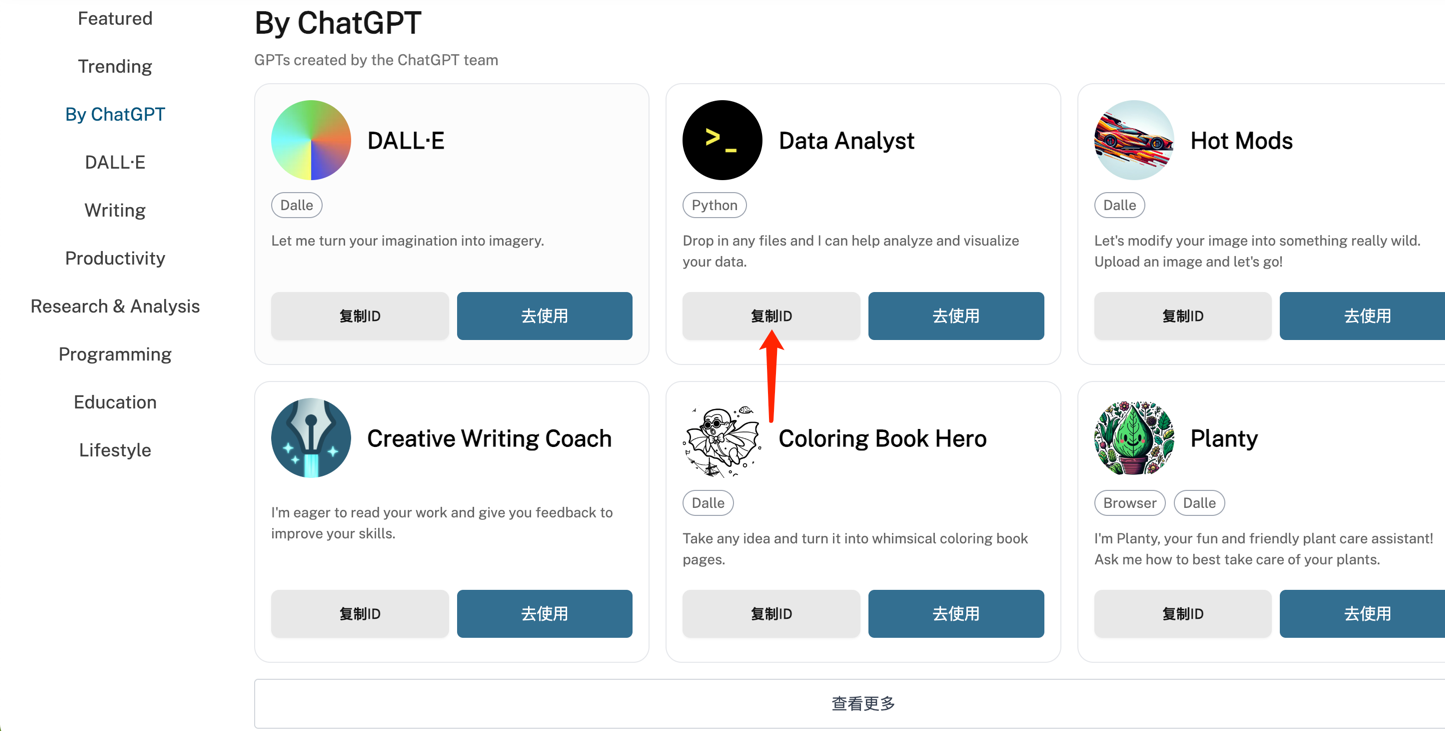
- 复制粘贴ID
- 示例使用Code-interprter ID示例:g-HMNcP6w7d
curl --location 'https://beta.gpt4api.plus/standard/gizmos' \
--header 'Content-Type: application/json' \
--header 'Authorization: Bearer <自己的Access_Token>' \
--data '{
    "message": "1+2+3+4+....100=? 使用python",
    "model": "gpt-4-gizmo",
    "gizmo_id": "g-HMNcP6w7d"
}'
返回结果:
{
    "created": 1708835081,
    "message_id": "76e4ce23-2f76-427b-8420-0bc0b5983c90",
    "conversation_id": "5e78a4d5-6dbf-4207-a8fa-b6333d2c8c38",
    "end_turn": false,
    "contents": [
        {
            "conversation_id": "5e78a4d5-6dbf-4207-a8fa-b6333d2c8c38",
            "error": null,
            "message": {
                "author": {
                    "metadata": {},
                    "name": null,
                    "role": "assistant"
                },
                "content": {
                    "content_type": "text",
                    "parts": [
                        "1加到100的和等于5050。"
                    ]
                },
                "create_time": 1708835081.244095,
                "end_turn": true,
                "id": "76e4ce23-2f76-427b-8420-0bc0b5983c90",
                "metadata": {
                    "citations": [],
                    "finish_details": {
                        "stop_tokens": [
                            100260
                        ],
                        "type": "stop"
                    },
                    "gizmo_id": "g-HMNcP6w7d",
                    "is_complete": true,
                    "message_type": "next",
                    "model_slug": "gpt-4-gizmo",
                    "parent_id": "f97bcd55-1050-4464-9d96-028aa327450c"
                },
                "recipient": "all",
                "status": "finished_successfully",
                "update_time": null,
                "weight": 1
            }
        }
    ]
}
批量调用脚本
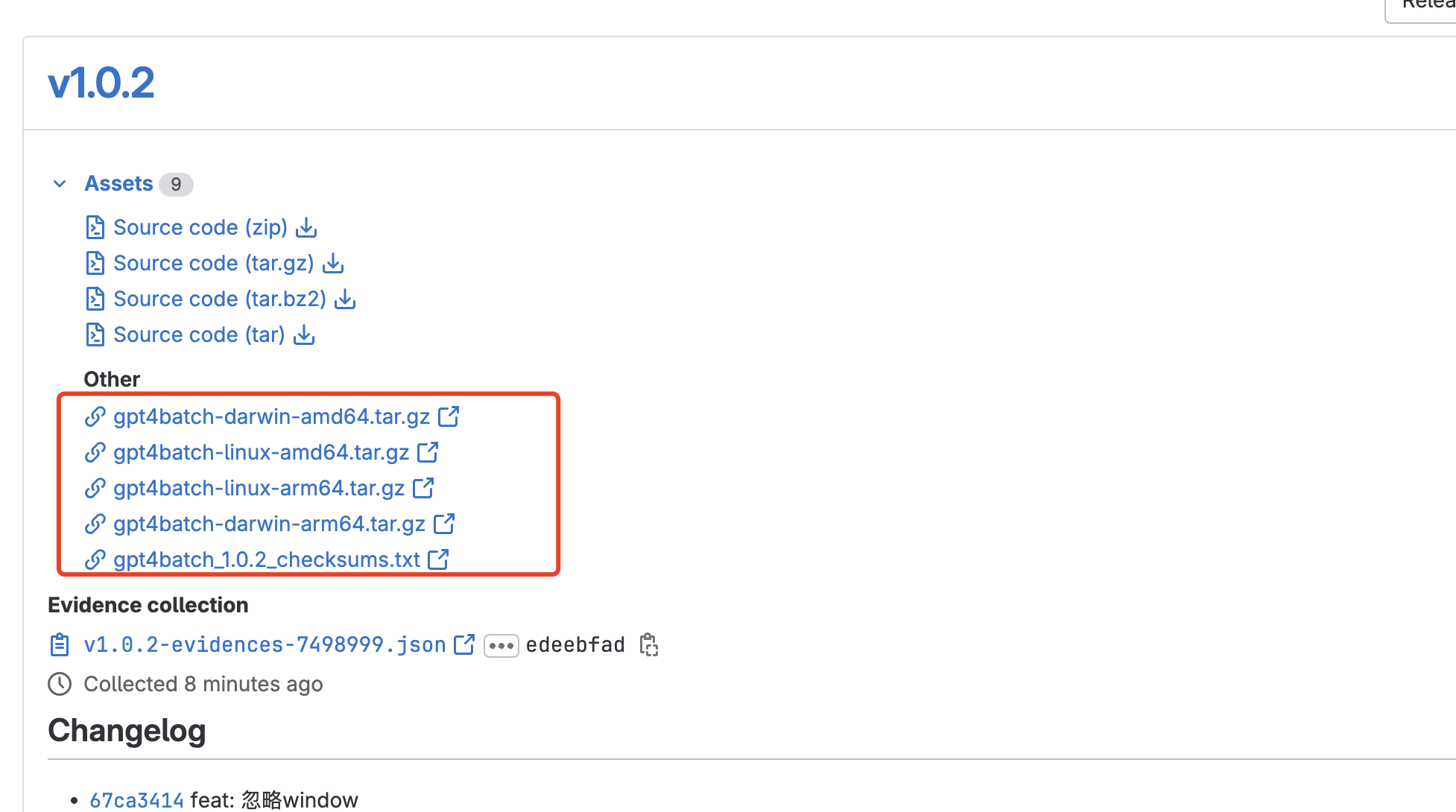
SDK 脚本下载地址
获取批量脚本认证
如何还未注册账号,请访问官网注册。
gpt4batch authsvc -e <邮箱地址> -p <密码>
批量调用脚本
续跑与非续跑区别:
- 非续跑:会将脚本中的文件从头到尾跑一遍。(中间可能有错误的)
- 续跑:成功的不会再跑,只会跑错误的。
Usage:
  gpt4batch batchsvc [flags]

Flags:
  -d, --download-dir string             下载文件夹名称.如果未设置会存在当前文件夹目录.
  -p, --download-prefix string          设置文件下载前缀,防止下载文件名冲突覆盖. (default "GPT4API")
  -e, --enable-download                 是否开启文件下载. (default true)
  -n, --enable_nsq                      是否开启NSQ消息队列.
  -f, --fix                             是否开启续跑模式.
  -z, --gizmo-id string                 设置GPTs gizmo id的名称.
  -g, --goroutine int                   设置最大协程数量. (default 60)
  -h, --help                            help for batchsvc
  -s, --history_and_training_disabled   是否开启历史对话历史记录,默认是关闭的. (default true)
  -i, --in string                       输入文件路径,数据格式按照规定格式定义. (default "example.jsonl")
  -m, --model string                    设置调用GPTs的模型. (default "gpt-4-gizmo")
  -o, --out string                      输出文件路径,GPTs数据跑完存储数据的文件路径. (default "out.jsonl")
  -q, --qps int                         设置QPS并发量. (default 1)
  -r, --rdb                             是否开启RDB文件缓存持久化策略. (default true)
  -v, --rdb_interval int                RDB缓存时间间隔,默认是60分钟 (default 60)
  -l, --upload_url string               设置批量调用服务地址.普通版:standard 并发版:concurrent (default "https://beta.gpt4api.plus/standard/uploaded")
  -u, --url string                      设置批量调用服务地址.普通版:standard 并发版:concurrent (default "https://beta.gpt4api.plus/standard/all-tools")
非续跑示例:
gpt4batch batchsvc -l <上传文件地址:https://beta.gpt4api.plus/standard/uploaded> -u <gpt对话地址:https://beta.gpt4api.plus/standard/all-tools> -i <输入需要跑的文件名> -o <输出需要跑的文件名> -g <默认QPS> -m <GPT模型:gpt-4>
续跑示例:
gpt4batch batchsvc -l <上传文件地址:https://beta.gpt4api.plus/standard/uploaded> -u <gpt对话地址:https://beta.gpt4api.plus/standard/all-tools> -i <输入需要跑的文件名> -o <输出需要跑的文件名> -g <默认QPS> -m <GPT模型:gpt-4> -f=true
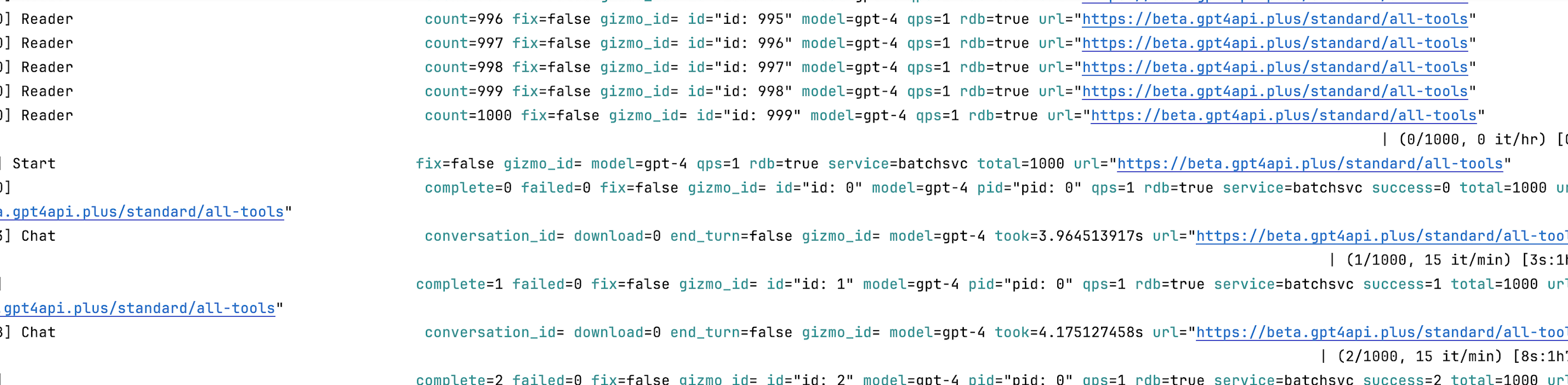
脚本运行示例图