
麻雀GPTs-API 文档中心
产品介绍
欢迎使用麻雀GPTs-API服务!我们的产品旨在提供高效、可靠的解决方案,以满足您的需求。以下是我们产品的一些主要特点:
- 丰富的GPTs市场:支持10000+不同的GPTs类型,包含不同领域的专家助手。
- 强大的性能:支持批量GPT-4,GPTs等模型接口调用,不同类型的GPTs服务调用。
- 灵活的集成:支持多种编程语言和平台,方便快速集成到不同的项目中。
- 价格更加低廉:平均1元调用10次GPT的API。
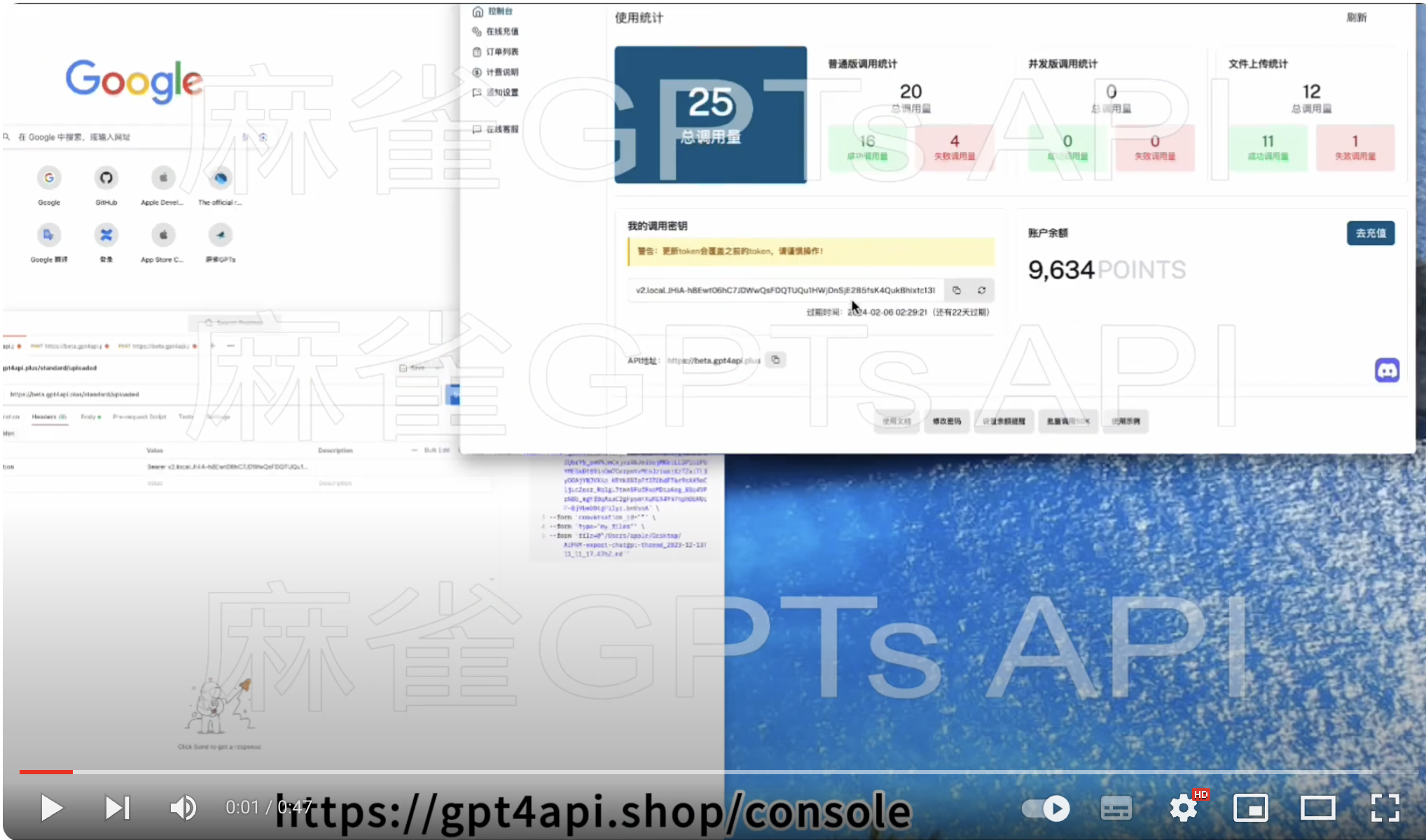
视频课程
支持模型
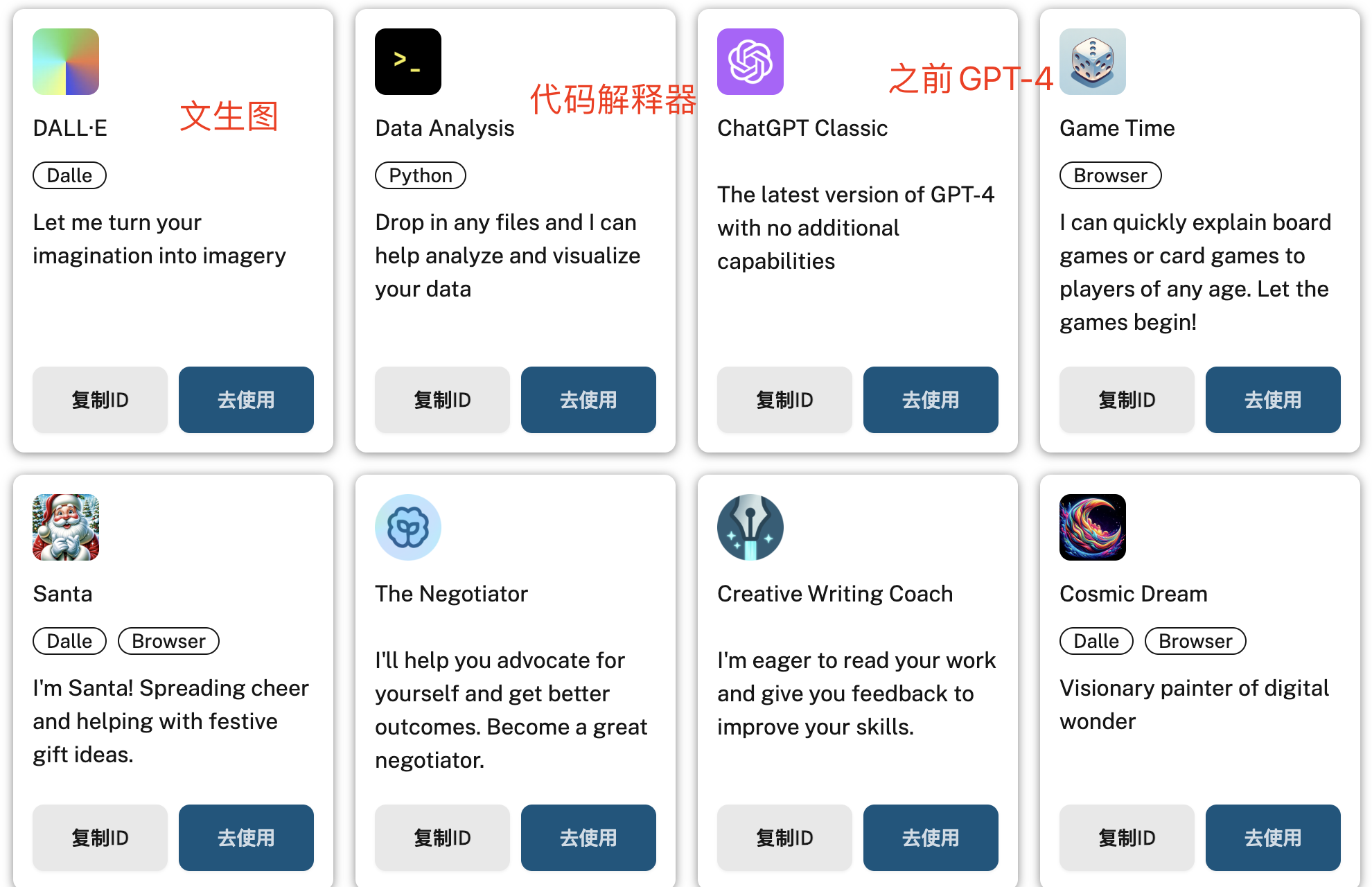
GPT-3.5: 具备广泛的自然语言处理能力,可用于文本生成、对话系统、翻译、问题回答等任务。
GPT-4 (All Tools): 不仅继承了 GPT-3.5 的强大自然语言处理功能,还新增了上网(Browsing)、高级数据分析(Advanced Data Analysis)以及 DALL·E 工具。调用示例
GPT-4-Gizmo: 是 GPT-4 的一个变体,也包含了上网(Browsing)、高级数据分析(Advanced Data Analysis)以及 DALL·E 工具。同时支持
GPTs服务调用。调用示例
注意:可访问GPTs商店或Openai官网获取GPTs ID
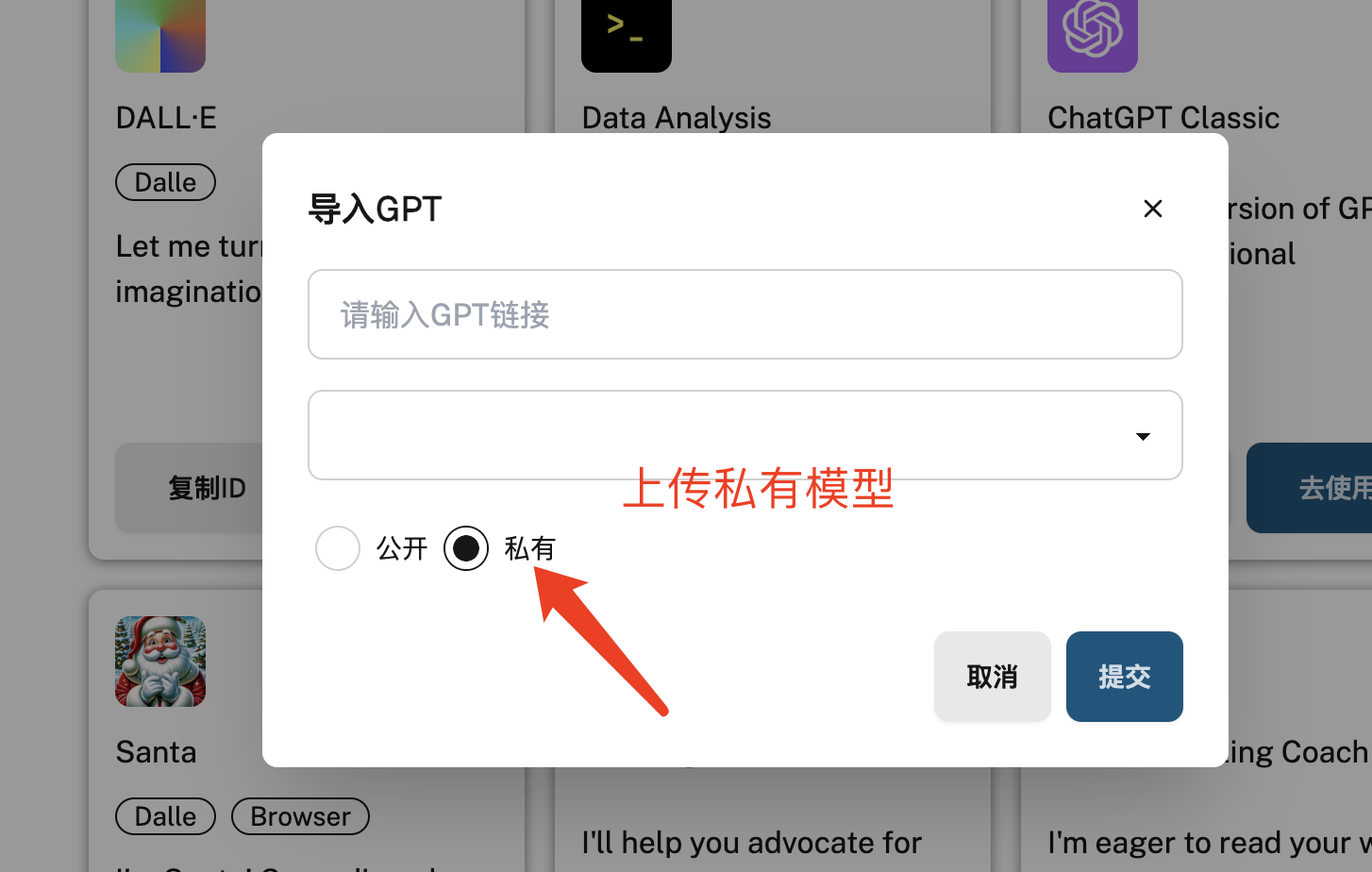
私有模型上传
用户可以获取指定官方模型调用批量接口对话,也可上传私有模型批量对话。以下是上传私有模型示例:
注释:GPT-4模型支持批量文件上传和下载。
充值说明
兑换比例:CN¥1= 100 POINTS
警告提示:计费点数(POINTS)可能会根据市场波动发生变化,请用户根据最新信息进行交易和使用。
- 支持支付宝支付和国内信用卡充值( Stripe ),进入点数充值页面即可。
- 点数有效期为最后一次充值之后的半年(180 天),可以在余额查询接口查询到期时间。
- 未使用完的点卷可申请退款,按照剩余点卷数量返还余额。一般 1 到 2 天内到账。
- 支付成功但未到账,请刷新右上角点数按钮。也可直接联系客服或在Discard反馈。
计费说明
兑换比例:CN¥1= 100 POINTS
警告提示:计费点数(POINTS)可能会根据市场波动发生变化,请用户根据最新信息进行交易和使用。
如果您有更高并发的需求或特殊服务定制的要求,请直接联系我们的客户服务团队。我们将为您提供专业的支持,并根据您的业务需求提供定制化的解决方案。
PostMan 接口文档
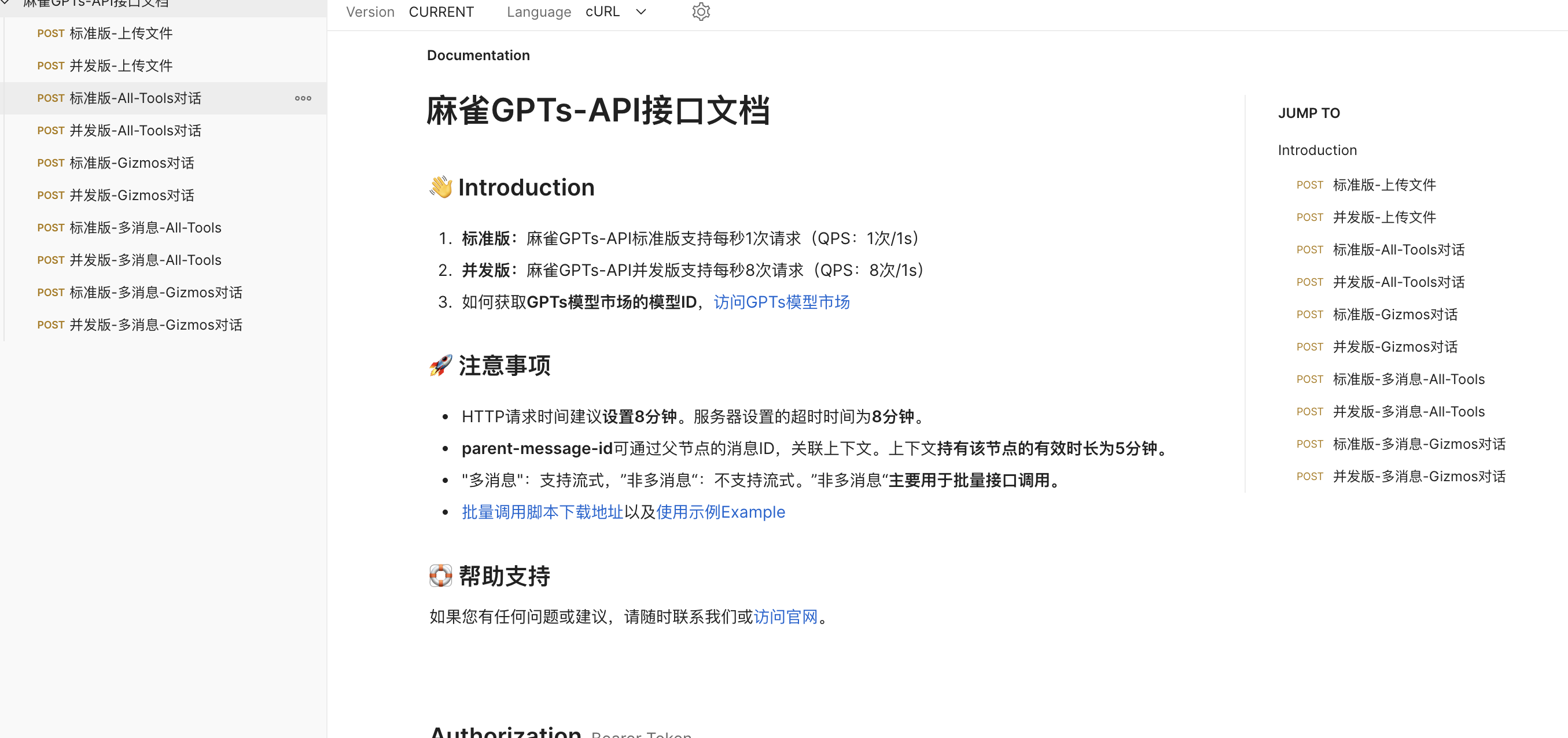
示例代码 Golang & Python
轻松使用,傻瓜式集成。
快速接入
1. 获取接口API秘钥
您需要通过访问 GPT4API开发者平台 注册并获取API密钥。API密钥将用于对接麻雀GPTs-API批量接口调用服务。
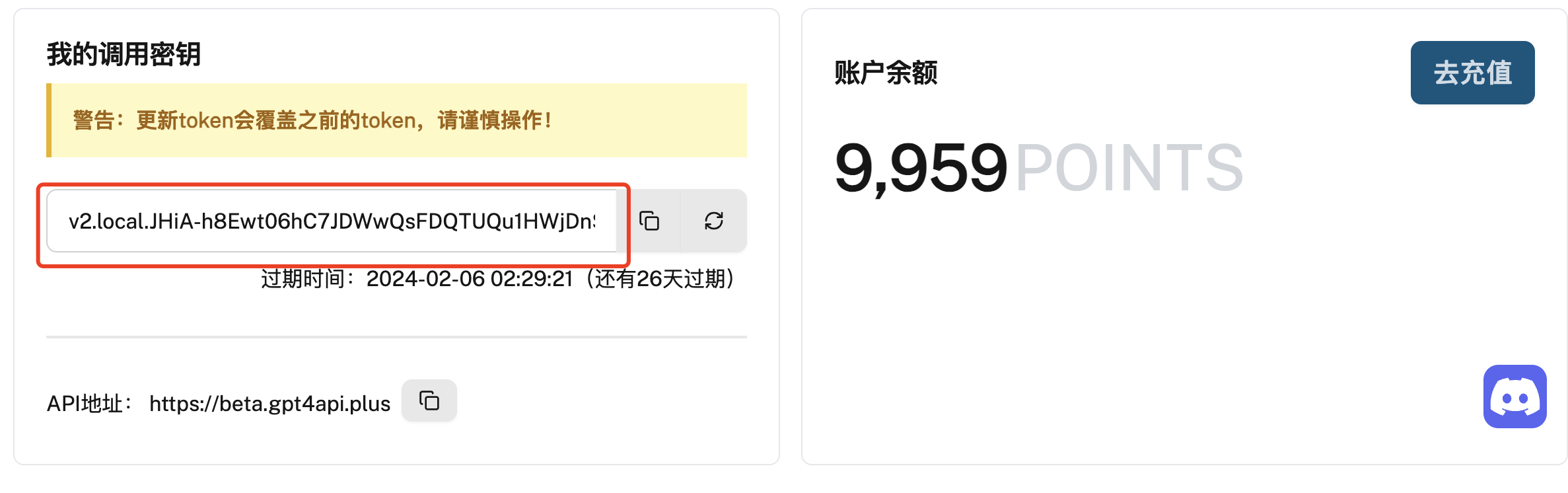
注意:切勿泄露API的秘钥,请妥善保管。如发现丢失,可更新access_token即可将之前access_token失效
2. 选择合适的模型
在接入过程中,您可以选择使用支持的模型版本,目前支持GPT-3.5-turbo,GPT-4,GPT-4-Gizmo模型,具体取决于您的需求和预算。详细的功能和价格信息请参考相应的文档。
3. 生产服务域名地址
生产域名: https://beta.gpt4api.plus
4. 接口请求路径
| 并发模式 | 接口名称 | OpenAI模型 | 接口说明 |
|---|---|---|---|
| 普通模式 | /standard/uploaded | GPT-4 | 文件上传 |
| 普通模式 | /standard/all-tools | GPT-4 & GPT-3.5 | GPT模型对话 |
| 普通模式 | /standard/gizmos | GPT-4-Gizmo | GPTs模型对话 |
| 普通模式 | /standard/openai-system/all-tools | GPT-4 & GPT-3.5 | GPT模型对话 支持多Messages |
| 普通模式 | /standard/openai-system/gizmos | GPT-4 & GPT-3.5 | GPT模型对话 支持多Messages |
| 并发模式 | /concurrent/uploaded | GPT-4 | 文件上传 |
| 并发模式 | /concurrent/all-tools | GPT-4 & GPT-3.5 | GPT模型对话 |
| 并发模式 | /concurrent/gizmos | GPT-4-Gizmo | GPTs模型对话 |
| 并发模式 | /standard/openai-system/all-tools | GPT-4 & GPT-3.5 | GPT模型对话 支持多Messages |
| 并发模式 | /standard/openai-system/gizmos | GPT-4 & GPT-3.5 | GPT模型对话 支持多Messages |
5. 请求超时设置
目前 每个请求的超时时间为8分钟,如果当前话术没说完,会继续continue,类似于网页端continue按钮,继续完成未说完的话。
OpenAI 官方接口挂了,这在最近是常态,可以在 官方状态页 查看大故障。不过一般接口慢不显示在这里,这种情况只能等待官方恢复 你尝试让 GPT 返回长内容(比如 max_tokens 为 12000~24000),但生成内容超时。这种情况可以通过指定 max_tokens,让其返回内容短一些来解决。
建议:请求设置时长为8分钟。防止返回数据不完整或不全。
6. 文件下载
代码解释器生成的文件问题:
如果需要开启下载文件,需要设置history_and_training_disabled设置为false,默认是关闭历史记录。不然会出现下载文件404或500等错误。
7. 文件上传示例
- Authorization:控制台认证AccessToken
- conversation_id: 注释:会话id
- type: 注释:上传类型
- file: 注释:文件或图片路径
- 请求方法: POST
- 请求头: Content-Type: application/json
- 请求体: Authorization: Bearer [Your_Auth_Token]
- 错误码
请求方法:
POST
- 请求头
Content-Type: application/json
Authorization: Bearer [Your_Auth_Token]
- 请求体
conversation_id: [注释:会话ID,记录文件上传所在的会话]
type: [注释:文件类型:my_files 图片类型:multimodal]
文件上传
文件上传示例:
curl --location 'https://beta.gpt4api.plus/standard/uploaded' \
--header 'Content-Type: application/json' \
--header 'Authorization: Bearer [Your_Auth_Token]' \
--form 'conversation_id=""' \
--form 'type="my_files"' \
--form 'file=@"/path/to/file"'
响应返回结果
{
  "conversation_id": "internal:XqGxTMB8Azu8JrFWwizgKs",
  "attachment": {
    "id": "file-T4NqR7nuLrjLwHttlnhne3dy",
    "name": "AIPRM-export-chatgpt-thread_2023-12-13T11_11_17.476Z.md",
    "size": 15249,
    "mimeType": "text/markdown"
  },
  "part": null
}
8. All-Tools对话
Authorization:控制台认证AccessToken
选择文件对话
- 第一步调用上传文件接口
- 第二步调GPT-4对话接口
- 提示:文件类型:attachments 参数必传。 图片类型:parts参数必传入参数,文本类型对话,忽略参数
请求方法: POST
请求头: Content-Type: application/json
请求体: Authorization: Bearer [Your_Auth_Token]
请求方法
POST
- 请求头
Content-Type: application/json
Authorization: Bearer [Your_Auth_Token]
- 请求体
{
    "message": "你是gpt3还是gpt4",
    "model": "gpt-4或gpt-3.5-turbo",
    "parent_message_id": "父节点的消息id",
    "conversation_id": "会话id",
    "attachments": [{
        "id": "附件id",
        "name": "附件名称",
        "size": "附件尺寸",
        "fileTokenSize": "附件file_token",
        "mimeType": "附件类型"
    }],
    "parts": [{
        "asset_pointer": "图片指针",
        "size_bytes": "图片大小",
        "width": "图片宽度",
        "height": "图片高度",
        "mimeType": "图片类型"
    }],
    "history_and_training_disabled": "是否隐藏对话记录"
}
- 对话示例:
curl --location 'https://beta.gpt4api.plus/standard/all-tools' \
--header 'Content-Type: application/json' \
--header 'Authorization: Bearer [Your_Auth_Token]' \
--data '{
    "message": "hello",
    "model": "gpt-4",
    "parent_message_id": "父节点的消息id",
    "conversation_id": "会话id",
    "attachments":[ {
        "id":"附件id",
        "name": "附件名称",
        "size": "附件尺寸",
        "fileTokenSize": "附件file token",
        "mimeType": "附件类型"
    }],
    "parts":[ {
        "asset_pointer": "图片指针",
        "size_bytes": "图片大小",
        "width": "图片宽度",
        "height": "图片高度",
        "mimeType": "图片类型"
    }],
    "history_and_training_disabled": "是否隐藏对话记录"
}'
响应返回结果
{
  "created": 1705161633,
  "message_id": "b571ebdc-ca58-416c-b433-8b16c2dcfdfe",
  "conversation_id": "111a6011-1147-4166-beba-8f9e18ce96bd",
  "end_turn": false,
  "contents": [
    {
      "conversation_id": "111a6011-1147-4166-beba-8f9e18ce96bd",
      "error": null,
      "message": {
        "author": {
          "metadata": {},
          "name": null,
          "role": "system"
        },
        "content": {
          "content_type": "text",
          "parts": [
            ""
          ]
        },
        "create_time": null,
        "end_turn": true,
        "id": "93e96dcc-5230-40c9-a1cd-e1dd4fa5784e",
        "metadata": {},
        "recipient": "all",
        "status": "finished_successfully",
        "update_time": null,
        "weight": 0
      }
    },
    {
      "conversation_id": "111a6011-1147-4166-beba-8f9e18ce96bd",
      "error": null,
      "message": {
        "author": {
          "metadata": {},
          "name": null,
          "role": "user"
        },
        "content": {
          "content_type": "text",
          "parts": [
            "hello"
          ]
        },
        "create_time": 1705161633.752518,
        "end_turn": null,
        "id": "285c3800-a60c-4aff-adaa-a15657aa663f",
        "metadata": {
          "attachments": [
            {
              "fileTokenSize": 15249,
              "id": "file-T4NqR7nuLrjLwHttlnhne3dy",
              "mimeType": "text/markdown",
              "name": "AIPRM-export-chatgpt-thread_2023-12-13T11_11_17.476Z.md",
              "size": 15249
            }
          ],
          "message_type": null,
          "timestamp_": "absolute"
        },
        "recipient": "all",
        "status": "finished_successfully",
        "update_time": null,
        "weight": 1
      }
    },
    {
      "conversation_id": "111a6011-1147-4166-beba-8f9e18ce96bd",
      "error": null,
      "message": {
        "author": {
          "metadata": {},
          "name": null,
          "role": "assistant"
        },
        "content": {
          "content_type": "text",
          "parts": [
            "Hello! How can I assist you today?"
          ]
        },
        "create_time": 1705161633.784164,
        "end_turn": true,
        "id": "b571ebdc-ca58-416c-b433-8b16c2dcfdfe",
        "metadata": {
          "finish_details": {
            "stop_tokens": [
              100260
            ],
            "type": "stop"
          },
          "inline_gizmo_id": null,
          "is_complete": true,
          "message_type": "next",
          "model_slug": "gpt-4",
          "parent_id": "285c3800-a60c-4aff-adaa-a15657aa663f"
        },
        "recipient": "all",
        "status": "finished_successfully",
        "update_time": null,
        "weight": 1
      }
    }
  ]
}
9. GPTs-Gizmo对话
- Authorization:控制台认证AccessToken
- 选择文件对话
- 第一步调用上传文件接口
- 第二步调GPT-4对话接口
- 友情提示文件类型是图片类,parts参数必传入参数,非图片类型对话,忽略参数
- gizmo_id 参数必传入 参数从GPTS商店获取
gizmo_id
- 请求方法: POST
- 请求头: Content-Type: application/json
- 请求体: Authorization: Bearer [Your_Auth_Token]
- 错误码
POST
- 请求头
Content-Type: application/json
Authorization: Bearer [Your_Auth_Token]
- 请求体
{
    "message": "你是gpt3还是gpt4",
    "model": "gpt-4-gizmo",
    "gizmo_id": "GPTs模型id",
    "parent_message_id": "父节点的消息id",
    "conversation_id": "会话id",
    "attachments": [{
      "id": "附件id",
      "name": "附件名称",
      "size": "附件尺寸",
      "fileTokenSize": "附件file_token",
      "mimeType": "附件类型"
    }],
    "parts": [{
      "asset_pointer": "图片指针",
      "size_bytes": "图片大小",
      "width": "图片宽度",
      "height": "图片高度",
      "mimeType": "图片类型"
    }],
    "history_and_training_disabled": "是否隐藏对话记录"
}
- 对话示例:
curl --location 'https://beta.gpt4api.plus/standard/gizmos' \
--header 'Content-Type: application/json' \
--header 'Authorization: Bearer [Your_Auth_Token]' \
--data '{
    "message": "你是gpt3还是gpt4",
    "model": "gpt-4-gizmo",
    "gizmo_id": "GPTs模型id",
    "parent_message_id": "父节点的消息id",
    "conversation_id": "会话id",
    "attachments":[ {
        "id":"附件id",
        "name": "附件名称",
        "size": "附件尺寸",
        "fileTokenSize": "附件file token",
        "mimeType": "附件类型"
    }],
    "parts": [{
        "asset_pointer": "图片指针",
        "size_bytes": "图片大小",
        "width": "图片宽度",
        "height": "图片高度",
        "mimeType": "图片类型"
    }],
    "history_and_training_disabled": "是否隐藏对话记录"
}'
响应返回结果
{
  "created": 1705161655,
  "message_id": "163f587c-b39b-4265-a980-e6349a99efe3",
  "conversation_id": "d5838e5f-4e05-4967-b4bc-52c40550fccc",
  "end_turn": false,
  "contents": [
    {
      "conversation_id": "d5838e5f-4e05-4967-b4bc-52c40550fccc",
      "error": null,
      "message": {
        "author": {
          "metadata": {},
          "name": null,
          "role": "system"
        },
        "content": {
          "content_type": "text",
          "parts": [
            ""
          ]
        },
        "create_time": null,
        "end_turn": true,
        "id": "190139ed-a86f-455f-bb31-5d5f60032d79",
        "metadata": {},
        "recipient": "all",
        "status": "finished_successfully",
        "update_time": null,
        "weight": 0
      }
    },
    {
      "conversation_id": "d5838e5f-4e05-4967-b4bc-52c40550fccc",
      "error": null,
      "message": {
        "author": {
          "metadata": {},
          "name": null,
          "role": "system"
        },
        "content": {
          "content_type": "text",
          "parts": [
            ""
          ]
        },
        "create_time": null,
        "end_turn": null,
        "id": "f2bc0d0f-db31-49b5-a13d-97fc96dab1ed",
        "metadata": {},
        "recipient": "all",
        "status": "finished_successfully",
        "update_time": null,
        "weight": 1
      }
    },
    {
      "conversation_id": "d5838e5f-4e05-4967-b4bc-52c40550fccc",
      "error": null,
      "message": {
        "author": {
          "metadata": {},
          "name": null,
          "role": "user"
        },
        "content": {
          "content_type": "text",
          "parts": [
            "hello"
          ]
        },
        "create_time": 1705158645.192561,
        "end_turn": null,
        "id": "xxxxxx",
        "metadata": {
          "attachments": [
            {
              "fileTokenSize": 15249,
              "id": "xxxxxx",
              "mimeType": "xxxxxx",
              "name": "xxxxxx",
              "size": 15249
            }
          ],
          "message_type": null,
          "timestamp_": "absolute"
        },
        "recipient": "all",
        "status": "finished_successfully",
        "update_time": null,
        "weight": 1
      }
    },
    {
      "conversation_id": "0d6cfe5d-9d15-4d0c-a5c5-594b8fd3b298",
      "error": null,
      "message": {
        "author": {
          "metadata": {},
          "name": null,
          "role": "assistant"
        },
        "content": {
          "content_type": "text",
          "parts": [
            "Hello! How can I assist you today? If you have any questions or tasks related to the file you've uploaded, feel free to let me know!"
          ]
        },
        "create_time": 1705158645.530299,
        "end_turn": true,
        "id": "xxxxxx",
        "metadata": {
          "finish_details": {
            "stop_tokens": [
              100260
            ],
            "type": "stop"
          },
          "inline_gizmo_id": "g-HMNcP6w7d",
          "is_complete": true,
          "message_type": "next",
          "model_slug": "gpt-4-gizmo",
          "parent_id": "xxxxxx"
        },
        "recipient": "all",
        "status": "finished_successfully",
        "update_time": null,
        "weight": 1
      }
    }
  ]
}
10. 免费GPT-3.5对话
POST https://g3.gpt4api.plus/backend-api/conversation
Content-Type: application/json
Authorization:  <控制台秘钥>

{
  "messages": [
    {
      "content": {
        "content_type": "text",
        "parts": [
          "你是gpt-3还是4?"
        ]
      }
    }
  ]
}
11. 获取池子个数
### 获取模型池子
GET http://localhost:8080/backend-api/namespace
Content-Type: application/json
Authorization:  <控制台秘钥>
注意:
错误码
| 错误码 | 说明 |
|---|---|
| 200 | 请求成功 |
| 409 | 请求参数错误 |
| 415 | 返回模型非GPT-4模型 |
| 401 - 身份验证无效 | 原因:身份验证无效 |
| 解决方案:确保使用正确的API 密钥和请求组织。 | |
| 401 - 提供的 API 密钥不正确 | 原因:请求的API密钥不正确。 |
| 解决方案:确保使用的 API 密钥正确,清除浏览器缓存,或生成新的。 | |
| 401 - 您必须是组织的成员才能使用 API | 原因:您的帐户不属于组织。 |
| 解决方案:联系我们以添加到新组织,或要求您的组织经理邀请您加入组织。 | |
| 402 | 原因:您的账号余额不足。 |
| 解决方案:请充值您的账户。 | |
| 429 - 请求达到速率限制 | 原因:您发送请求的速度太快。 |
| 解决方案:调整您的请求。阅读速率限制指南。 | |
| 429 - 您超出了当前配额,请检查您的计划和账单详细信息 | 原因:您的积分已用完或已达到每月最高支出。 |
| 解决方案: 购买更多积分或了解如何增加限额。 | |
| 500 - 服务器在处理您的请求时发生错误 | 原因:我们的服务器出现问题。 |
| 解决方案:短暂等待后重试您的请求,如果问题仍然存在,请联系我们。检查状态页。 | |
| 503 - 引擎当前过载,请稍后再试 | 原因:我们的服务器流量很高。 |
| 解决方案:请稍等片刻后重试您的请求。 |
常见问题
- 为什么 ChatGPT Plus 的 GPT-4 回答和你们的 GPT-4 不一样?
简单来说,ChatGPT Plus 使用的模型版本和开放给 API 的并不一样,作为内部版本,很大可能会用更新的数据去训练,甚至是实时数据训练。虽然都叫 GPT-4,但给出的答案不同,因为训练数据不同。
- 如何确认自己调用的模型是GPT-4模型还是GPT-3模型?
提问模型:你是gpt-3还是gpt-4?模型会回答类似于:我是基于 GPT-4 架构的人工智能。
- 代码解释器功能使用中为什么有下载文件却没法下载报错?
需要打开历史记录 (history_and_training_disabled设置为false,默认是关闭历史记录)。
- GPT-4-Gizmo到底有何作用?该模型如何使用?
GPT-4-Gizmo 模型是一款强大的自然语言处理模型,专为用户个性化的 AI 助手服务而设计。其主要作用在于根据用户自己的 Plus 账号中创建的 AI 助手进行批量调用,以便更有效地处理大量对话或角色描述。利用 GPT-4-Gizmo 的特性,您可以轻松批量调用自己创建的 AI 助手,减少了繁琐的对话或角色描述的重复性工作。
- 批量调用的过程中,如何保证多轮对话的上下文理解?
每次一个会话id的调用,会有该会话的5分钟持有时间。通过同一个conversation_id和parent_message_id保证上下文会在同一组会话中。会话持有时间3分钟。